QR codes that don't suck
Branding, tracking and dynamic targets
 5 min read
Updated Sep 27, 2026
Print the link, not the destination
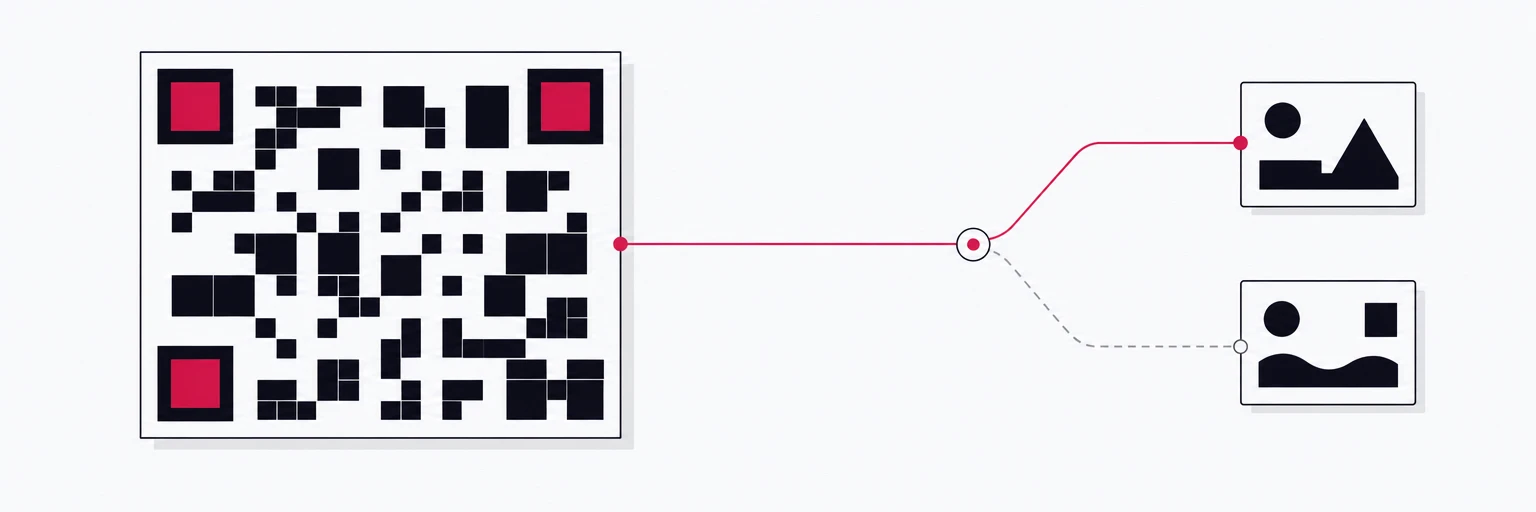
The single biggest QR mistake is encoding the final URL. The moment it is printed on packaging, a poster or a trade-show wall, it is frozen. The landing page gets redesigned, the campaign ends, the product moves to a new shop, and the code keeps pointing at whatever it pointed at on the day of the print run.
Encode a short link instead and the printed artifact becomes re-targetable: same code, new destination, no reprint. On rii.link a QR code made from a short link encodes that link, not the destination, so the ink is permanent and the pointer behind it stays yours to edit. Analytics, your custom domain and, on Premium, routing rules ride along automatically.
That one decision does more for your QR programme than any design choice below. Make it first.
Anatomy of a code that scans
A QR code is a grid of dark and light modules with three large finder squares in the corners, a quiet zone of empty space around the edge, and built-in error correction that lets a scanner reconstruct the data even when part of the code is damaged, dirty or covered by a logo.
| Error correction | Recovers up to | Use it when |
|---|---|---|
| L | 7% of the code | Screens, clean digital placements, smallest possible code |
| M | 15% | The default for most print |
| Q | 25% | Outdoor, packaging that gets handled |
| H | 30% | You are placing a logo in the middle, or the surface will be scuffed |
Higher correction means a denser code, so it is not free. Pick the level for the environment, and remember that a short link keeps the encoded data small, which keeps the code sparse and easy to scan in the first place.
Branding without breaking scannability
Logos, brand colours and rounded modules are all fine when you respect three constraints:
- Contrast. Keep dark modules on a light background and a contrast ratio of at least 4.5. Light-on-dark codes scan on some phones and fail on others; inverting is not worth the brand points.
- The finder patterns stay intact. The three corner squares are how a camera locates the code. Style their corners if you like, but never cover or recolour them into the background.
- The logo budget comes out of error correction. A centred logo covers modules, and the scanner recovers them only if the correction level has room. With level H a logo can safely take roughly a fifth of the area; with level L it should not be there at all.
rii.link's QR studio exposes exactly these knobs: foreground and background colour, module shape (square, rounded or circle), corner radius, logo with a size limit, error correction level and output size, and renders a PNG. The public API also renders SVG for print for the links it creates, in your colours on square modules. Either way the code encodes the short link, so the design can change without changing what the code says.
Size and placement
The rule of thumb for physical size is scanning distance divided by ten. A code meant to be scanned from an arm's length of about 30 cm needs to be at least 3 cm wide; a poster read from three metres needs 30 cm. Add the quiet zone on top of that, at least four modules of empty margin on every side, and never let a fold, a seam or a bottle's curve run through the code.
Match the file to the surface. SVG scales to any print size without softening; PNG is right for screens, slides and email. Whatever formats you export, make them from the same short link so they encode the same thing.
One placement, one link
A code on a package insert and the same code on a poster should be two different short links. Not because the destination differs, but because the analytics do. Tag each with its own source and medium, for example utm_medium=qr with utm_source=packaging versus utm_source=poster, and offline placements finally compete fairly with online channels in the same report. The extra minute at setup is the only way to learn which surface actually converts, and which one to stop paying for.
Scan traffic shows up in rii.link analytics like any other click, broken down by device, country and referrer and counted apart from ordinary link visits, so QR traffic sits in the same report as the rest of the campaign, not in a separate spreadsheet.
Route the scan
Because the printed code resolves through the redirect, everything the redirect can do applies to a scan. With routing rules (a Premium feature on rii.link), two patterns earn their keep:
- Platform split. A single code on the box sends iPhones to the App Store, Android phones to Google Play and laptops with a webcam to a web page. One print, three destinations.
- Time window. A table-tent code that shows the lunch menu on weekdays from 11 to 14 and the dinner menu the rest of the time. A shop-window code that points to the booking page during opening hours and to a callback form after hours. The print never changes; the weekly schedule does the switching.
Test the ugliest realistic scenario
Every code should be scanned before it is signed off, and not in the studio. Test the worst case that will actually happen:
- Low light, a cracked screen protector, an older phone.
- Arm's length for print, across the room for posters, on the actual paper stock.
- Both native camera apps, iOS and Android, without a third-party scanner.
- The printed proof, not the PDF. Ink spread and matte laminates change contrast.
- The destination on a phone, since that is where every scan lands.
If it scans in that scenario, it scans everywhere. If it does not, raise the error correction, shrink the logo or grow the code, in that order.
Written by
Florian
Florian builds rii.link, the routing layer behind short links: redirects, dynamic responses and links that answer AI agents. He writes The Redirect about what happens between a click and its destination.